
IT-labs

Objectif général du lab:
Ce lab a pour objectif de concevoir, configurer et sécuriser une infrastructure réseau 100 % Cisco, de niveau intermédiaire, centrée sur :
- VLAN & segmentation
- Routage inter-VLAN (Router-on-a-Stick)
- Routage dynamique OSPF
- Sécurité réseau de base (switch + routeur)
Scénario
Tu es administrateur réseau dans une PME disposant de plusieurs services :
- Administration
- Informatique
- RH
- Invités
Chaque service doit être isolé logiquement (VLAN), tout en pouvant communiquer avec les autres via des règles maîtrisées. Le réseau est réparti sur deux bâtiments, reliés par des routeurs Cisco.
Architecture générale :
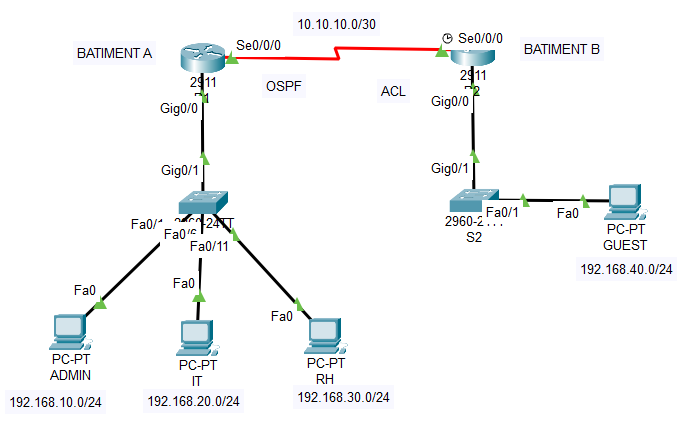
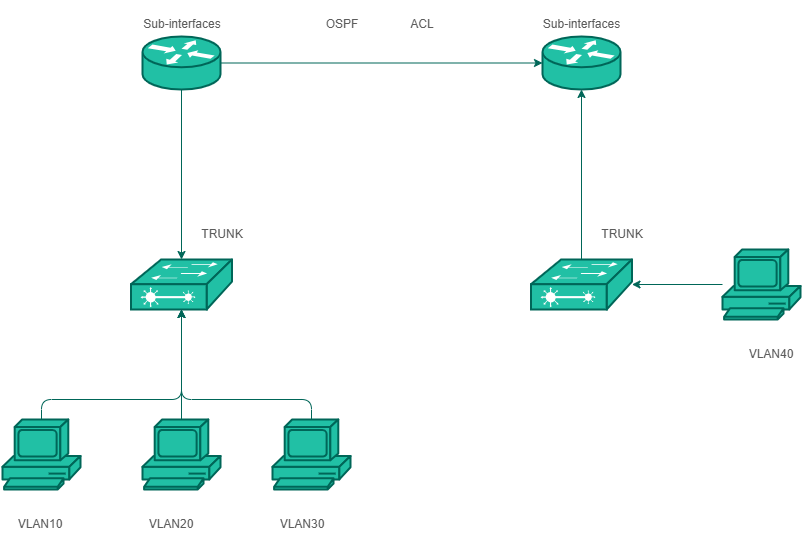
Bâtiment A
-
1 routeur Cisco (R1)
-
1 switch Cisco L2 (S1)
-
3 VLAN utilisateurs
Bâtiment B
-
1 routeur Cisco (R2)
-
1 switch Cisco L2 (S2)
-
1 VLAN utilisateurs
Lien inter-bâtiments
-
Liaison WAN simulée entre R1 et R2
Équipements requis
-
2 routeurs Cisco (ex: 1941 / 2911 / ISR)
-
2 switches Cisco L2 (ex: 2960)
-
8 PC (ou PC Packet Tracer)
-
Câbles Ethernet + série (si simulé)
-
Compatible avec Cisco Packet Tracer / GNS3 / EVE-NG.
Plan VLAN & adressage:
|
VLAN |
Nom |
Réseau |
Passerelle |
|
10 |
ADMIN |
192.168.10.0/24 |
192.168.10.1 |
|
20 |
IT |
192.168.20.0/24 |
192.168.20.1 |
|
30 |
RH |
192.168.30.0/24 |
192.168.30.1 |
|
40 |
GUEST |
192.168.40.0/24 |
192.168.40.1 |
WAN R1–R2 : 10.10.10.0/30
ÉTAPE 1 – Configuration des VLAN (S1)
S1> enable
S1# configure terminal
S1(config)# vlan 10
S1(config-vlan)# name ADMIN
S1(config-vlan)# exit
S1(config)# vlan 20
S1(config-vlan)# name IT
S1(config)# vlan 30
S1(config-vlan)# name RH
Affectation des ports
S1(config)# interface range f0/1-5
S1(config-if-range)# switchport mode access
S1(config-if-range)# switchport access vlan 10
S1(config)# interface range f0/6-10
S1(config-if-range)# switchport mode access
S1(config-if-range)# switchport access vlan 20
S1(config)# interface range f0/11-15
S1(config-if-range)# switchport mode access
S1(config-if-range)# switchport access vlan 30
ÉTAPE 2 – Configuration Trunk (S1 ↔ R1)
S1(config)# interface g0/1
S1(config-if)# switchport mode trunk
S1(config-if)# switchport trunk allowed vlan 10,20,30
S1(config)# no shutdown
ÉTAPE 3 – Routage Inter-VLAN (R1)
R1> enable
R1# configure terminal
R1(config)# interface g0/0.10
R1(config-subif)# encapsulation dot1Q 10
R1(config-subif)# ip address 192.168.10.1 255.255.255.0
R1(config)# interface g0/0.20
R1(config-subif)# encapsulation dot1Q 20
R1(config-subif)# ip address 192.168.20.1 255.255.255.0
R1(config)# interface g0/0.30
R1(config-subif)# encapsulation dot1Q 30
R1(config-subif)# ip address 192.168.30.1 255.255.255.0
R1(config)# interface g0/0
R1(config-if)# no shutdown
ÉTAPE 4 – Configuration VLAN & Trunk (S2)
S2(config)# vlan 40
S2(config-vlan)# name GUEST
S2(config)# interface g0/1
S2(config-if)# switchport mode trunk
S2(config-if)# switchport trunk allowed vlan 40
S2(config)# no sh
ÉTAPE 5 – Routage Inter-VLAN (R2)
R2(config)# interface g0/0.40
R2(config-subif)# encapsulation dot1Q 40
R2(config-subif)# ip address 192.168.40.1 255.255.255.0
R2(config)# interface g0/0
R2(config-if)# no shutdown
ÉTAPE 6 – Lien WAN R1–R2
R1(config)# interface s0/0/0
R1(config-if)# ip address 10.10.10.1 255.255.255.252
R1(config-if)# no shutdown
R2(config)# interface s0/0/0
R2(config-if)# ip address 10.10.10.2 255.255.255.252
R2(config-if)# no shutdown
ÉTAPE 7 – Routage dynamique OSPF
R1(config)# router ospf 1
R1(config-router)# network 192.168.10.0 0.0.0.255 area 0
R1(config-router)# network 192.168.20.0 0.0.0.255 area 0
R1(config-router)# network 192.168.30.0 0.0.0.255 area 0
R1(config-router)# network 10.10.10.0 0.0.0.3 area 0
ÉTAPE 8 – Sécurité de base
Sécurité switch
S1(config)# interface range f0/16-24
S1(config-if-range)# shutdown
S1(config)# interface range f0/1-15
S1(config-if-range)# spanning-tree portfast
S1(config-if-range)# spanning-tree bpduguard enable
ACL – Bloquer GUEST
R2(config)# access-list 100 deny ip 192.168.40.0 0.0.0.255 192.168.0.0 0.0.255.255
R2(config)# access-list 100 permit ip any any
R2(config)# interface g0/0.40
R2(config-if)# ip access-group 100 in
ÉTAPE 9 – Tests
ping 192.168.10.1
ping 192.168.40.10
show ip route
show ip ospf neighbor
À propos de nous
Zadross Labs est un site dédié aux labs techniques en réseaux, systèmes, sécurité et cloud. Il présente des projets concrets inspirés de situations réelles rencontrées par les administrateurs systèmes et réseaux et virtualisation: déploiement de DMZ, configuration de firewalls, routage et switching Cisco, services Active Directory, DNS, DHCP, Virtualisation GNS3, VMware, Virtualbox, ainsi que des environnements Linux (ubuntu, Debian..) et cloud. Chaque lab est documenté de manière structurée, avec une approche pratique, pédagogique et orientée bonnes pratiques professionnelles.
A propos
Souscrire
